UX Writing for Digital Services - Error messages
If a service does not have good error messages, people can become frustrated with the service.
An error message should:
- inform people that a problem occurred
- explain why it happened
- provide a solution for people to fix the problem
Use an error message when there is a validation error.
For example, when you need:
- to tell the people to choose an option before continuing
- people to correct or change their input to match what your system can accept
When to display an error message
Only display an error when a person tries to move to the next part of the service.
Do not show error messages:
- when people select or tab to a field
- as they are typing
- when they move away from a field
Placement
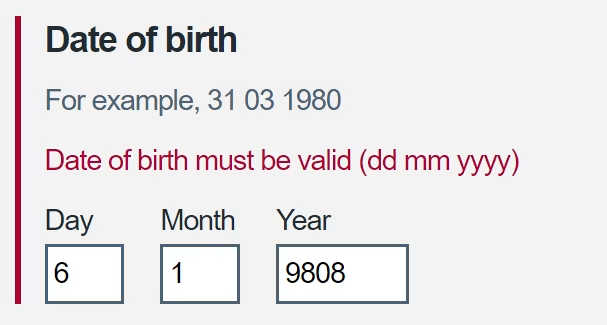
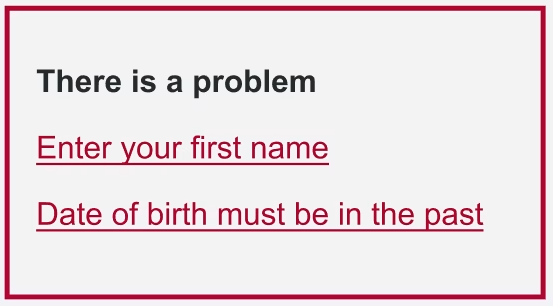
Put the error message in red text above the input field - and below the hint text if there is any - to the input field. Use an error summary at the top of a page to summarise any errors.
Do not put a full stop at the end of a single-sentence error message.
Generic messages
Do not write generic catch-all error messages for multiple issues. Create error messages that are specific to each issue.
Tone
Clear and direct language helps people understand what caused the error and how to fix it. Be active and positive. Instead of telling the person what they did wrong, tell them how to get it right.
Do not use humour. If someone is frustrated or angry, they won't be receptive to it. It can also be misinterpreted or distract from the goal.
Only use 'Sorry' in an error message that informs the person about:
- a system fault
- something they might find frustrating
- a serious problem
Avoid the word 'please' except in situations where the person is inconvenienced. For example, waiting for something to load or the product is to blame for the situation. If every instruction and error message uses the word please, it has less effect when it's needed.
Using 'please' means that a sentence risks being understood as a suggestion, rather than as an instruction. 'Please' can also cause problems in content that will be translated into other languages.
Error messages should be as short as possible. Including formal politeness like 'please' and 'thank you' can crowd error messages.
When not to use an error message
Do not use error messages to tell people that they are not eligible or do not have permission to do something.
Instead, take them to a screen that:
- explains why you cannot accept the entry or selection
- tells them what to do next
- includes a way to leave the transaction
Common error messages
This section contains text you can use for common error messages.
Names
If a first name or last name is not entered:
- Enter a first name
- Enter a last name
Phone numbers
If a mobile number contains a character that is not a number, hyphen or space:
- Mobile number can only contain numbers
If there is a requirement for a mobile number to be 10 or 11 digits:
- Mobile number must be 10 or 11 digits
If there is a requirement for a mobile number to begin with a valid UK or Irish prefix:
- Mobile number prefix is not valid
If the mobile number is not valid:
- Mobile number is not valid, check the number and try again
If email address is not in the correct format:
- Enter an email address in this format: name@example.com
PPS number
If PPS number is not in the correct format:
- PPS number should be 7 numbers followed by 1 or 2 letters
If PPS number is not a valid number:
- This is not a valid PPS number, check the number and try again
Date of birth
If the number in the day or month field is not valid:
For example, 31 03 1980
- Day must be between 1 and 31
- Month must be between 1 and 12
If the year is in the future:
- Date of birth must be in the past
If any field contains illegal characters
- Date of birth can only contain numbers
Eircode
If 'Eircode' field is empty
- Enter an Eircode
Address
If nothing is entered in the address line 1 field
- Enter address line 1
Country
If no country is selected in a country drop down
- Select a country
Radio buttons
If a radio button is not selected in a group of radio buttons
- Select an option
Validation codes
If a validation code is not valid
- This is not a valid code. Check your code and try again.
General validation errors
For any input field that requires a number at the start, but a person has entered a letter:
- This must start with a number, not a letter
For any input field that requires a letter at the start:
- This must start with a letter, not a number